Tutorial: joining panels into a full-disc mosaic
This walks through the mosaic from start to finished picture. We have no real mosaic
capture yet, so the panels here are cut from a real full-disc stack: the H-alpha capture
15_37_19.avi of 2026-10-20 (720 by 540 pixels, 1000 frames; the disc is 222 pixels in
radius), stacked with helia stack 15_37_19.avi -o stack.tif --preset ha. Cutting panels
from a picture whose answer we know shows what the method does to a real Sun's detail and
noise, and how close it gets; it does not show how it does with the panels of a real
mosaic, which differ in ways we cannot make up (seeing that changes between panels, the
flat-field of each place on the chip, a camera that was turned between panels). If you have
such a set of captures, please send one. The method is described in
Mosaics. You need Helia 0.6 or later.
1. Cut four panels, and join them
The easiest panels to try are plain crops of a stack. helia edit cuts a region
(--crop X,Y,W,H); four 400 by 300 panels in two rows overlap by 80 pixels in x and 60 in y:
helia edit stack.tif --crop 0,0,400,300     -o p1.tif
helia edit stack.tif --crop 320,0,400,300   -o p2.tif
helia edit stack.tif --crop 0,240,400,300   -o p3.tif
helia edit stack.tif --crop 320,240,400,300 -o p4.tif
helia mosaic p1.tif p2.tif p3.tif p4.tif -o m.tif
(With real panels you would give the captures, helia mosaic p1.ser p2.ser ... -o m.tif --
--preset ha: each is stacked the same way, and the stacks are kept in m-stacks/.) What you
should see:
joining 4 panels
4 panels joined into 722 x 542 px: 4 of 4 overlapping pairs used, worst disagreement 0.00 px
panels differ by 0.03% (RMS) over their overlaps and 0.03% along the seams
disc: centre (272.5, 295.6), radius 222.0 px
  panel 1 p1.tif  at (    0.00,     0.00) px  turn +0.000 deg  gain 1.000 offset +0.0000
  panel 2 p2.tif  at (  320.00,    -0.02) px  turn -0.007 deg  gain 1.000 offset -0.0000
  panel 3 p3.tif  at (   -0.00,   240.02) px  turn -0.001 deg  gain 1.000 offset +0.0000
  panel 4 p4.tif  at (  320.02,   240.01) px  turn -0.002 deg  gain 1.000 offset +0.0000
wrote m.tif (m-panels.csv, m-pairs.csv)
The panels were cut at (0, 0), (320, 0), (0, 240) and (320, 240), and are found at those places to 0.02 pixel, with a turn of under 0.01 degree and no change of gain: the answer. The first panel is the reference. The mosaic is 722 by 542 because the panels were found to be a hair out of square, which widens the box that holds them. The panels agree to 0.03% over their overlaps: the same picture, so what is left is the resampling.
2. Panels that differ
Real panels are not a perfect cut: they are taken at different times, through different seeing, with the camera turned a little, and the sky brightness and the gain differ. Here, the same stack was cut into six 330 by 330 panels (a grid of three by two), each with a known shift to a tenth of a pixel, a turn of up to 1.1 degrees, a gain of 0.91 to 1.07 with an offset, and noise of 0.004 added:
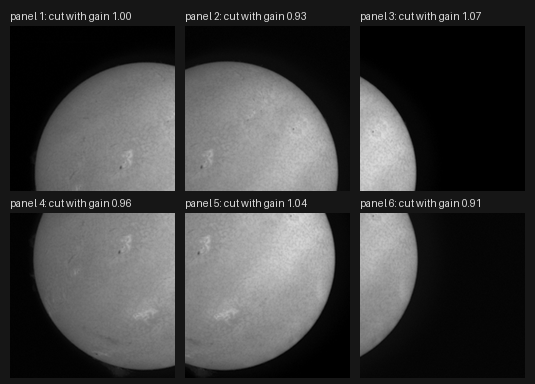
helia mosaic panel-1.png panel-2.png panel-3.png panel-4.png panel-5.png panel-6.png \
    -o joined.tif
joining 6 panels
6 panels joined into 713 x 545 px: 11 of 11 overlapping pairs used, worst disagreement 0.06 px
panels differ by 2.00% (RMS) over their overlaps and 2.08% along the seams
disc: centre (271.5, 299.6), radius 222.0 px
  panel 1 panel-1.png  at (    0.00,     0.00) px  turn +0.000 deg  gain 1.000 offset +0.0000
  panel 2 panel-2.png  at (  190.72,     3.41) px  turn +1.106 deg  gain 1.071 offset -0.0108
  panel 3 panel-3.png  at (  380.22,    -2.58) px  turn -0.698 deg  gain 0.939 offset +0.0098
  panel 4 panel-4.png  at (    4.30,   205.61) px  turn -0.998 deg  gain 1.038 offset -0.0088
  panel 5 panel-5.png  at (  193.41,   204.11) px  turn +0.605 deg  gain 0.957 offset +0.0097
  panel 6 panel-6.png  at (  377.93,   206.80) px  turn +0.895 deg  gain 1.090 offset -0.0173
Compare the table with what the panels were cut with:
| Panel | Cut at (x, y) | Found at | Cut turn | Found turn | Cut gain | Gain to undo it (found) |
|---|---|---|---|---|---|---|
| 2 | (190.70, 3.40) | (190.72, 3.41) | 1.1 | 1.106 | 0.93 | 1.075 (1.071) |
| 3 | (380.20, -2.60) | (380.22, -2.58) | -0.7 | -0.698 | 1.07 | 0.935 (0.939) |
| 4 | (4.30, 205.60) | (4.30, 205.61) | -1.0 | -0.998 | 0.96 | 1.042 (1.038) |
| 5 | (193.40, 204.10) | (193.41, 204.11) | 0.6 | 0.605 | 1.04 | 0.962 (0.957) |
| 6 | (377.90, 206.80) | (377.93, 206.80) | 0.9 | 0.895 | 0.91 | 1.099 (1.090) |
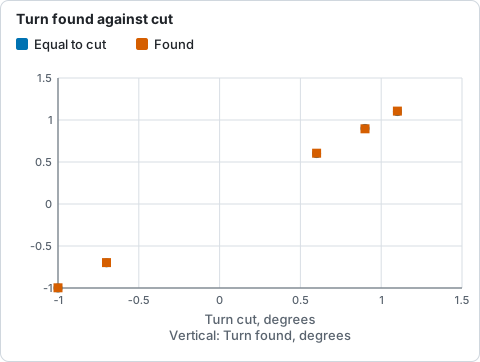
Turn found for each panel against the turn it was cut with, from the table above; the line of equality is cut against cut.
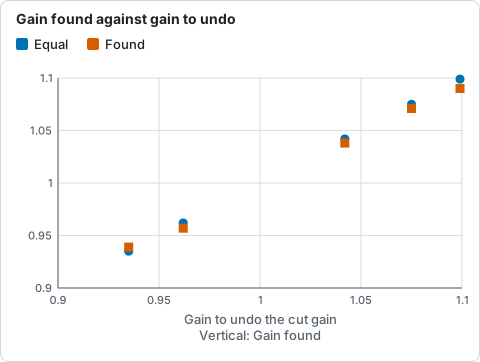
Gain found for each panel against the gain that would undo the one it was cut with (printed in the table above); the line is equality.
(These numbers are from 8-bit PNG panels; the test that cuts them in memory finds the
placements to 0.03 pixel and 0.006 degree.) The "gain to undo it" is 1/gain: a panel cut
dimmer is scaled up. The panels are matched to the first, so the mosaic is in panel 1's
brightness.
The panel table joined-pairs.csv says how each pair matched:
panel_a,panel_b,ncc,overlap_px,residual_px,used
1,2,0.9820,45176,0.020,true
1,4,0.9834,40284,0.007,true
1,5,0.9803,16916,0.043,true
...
Every correlation is above 0.97, every residual under 0.07 pixel and every pair is used. A
set that did not look like this would show it here first: a pair with a low ncc, a
large residual_px, or used false.
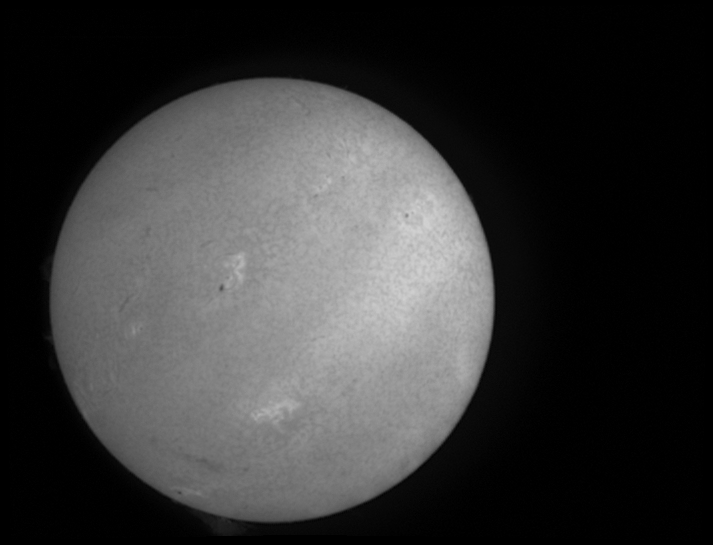
The six panels joined. The outer edge is the bounding box of the turned panels, black where no panel reached.
How well did it do? The panels were cut from a stack we still have, so the mosaic can be compared with it. This is the error of the mosaic against the stack, brightened eightfold, on the left joined without the brightness match and on the right with it, on the same scale:
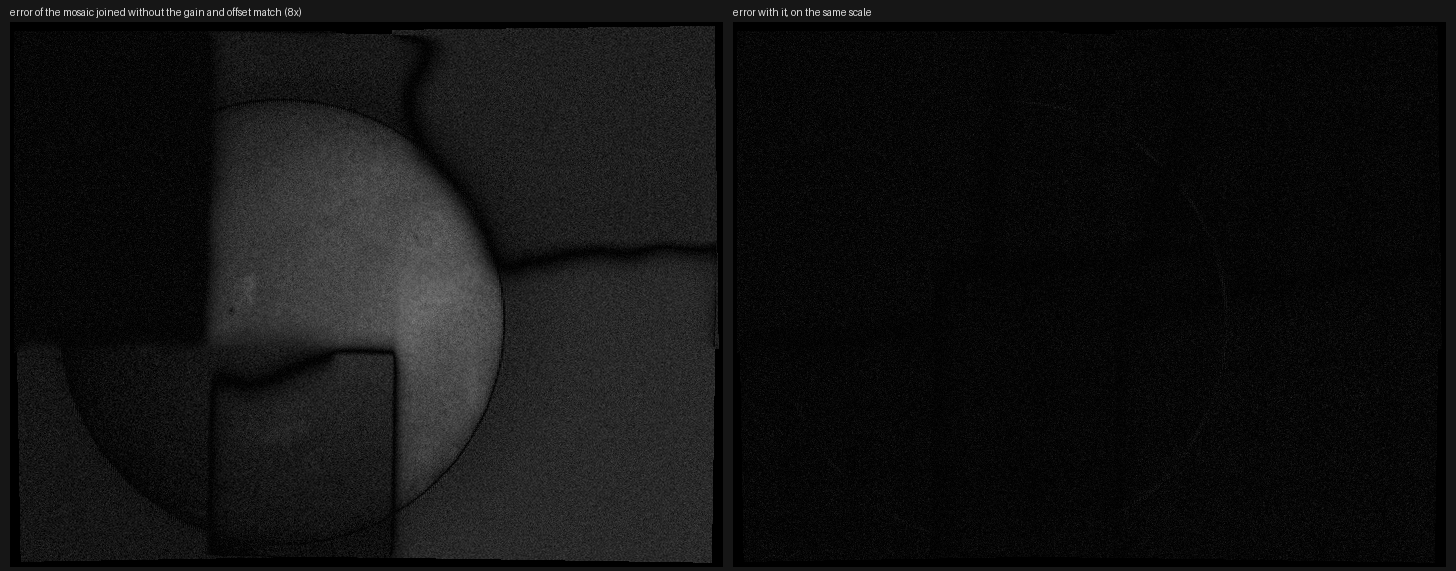
Without the match the panels show as steps of brightness, with a curving boundary where
each seam follows the smallest difference; with it nothing is left but the noise. The
numbers: against the stack, inside the disc, the RMS error is 0.0036 of full scale with the
match (the noise of each panel was 0.004) and 0.023 without; without noise it is 0.00036,
0.1% of the mean level, and the panels differ along the seams by 0.13% of the level. Blending by
the distance from each panel's edge instead of seams (--no-seams) gives the same RMS, 0.0036: the
panels cut from one picture agree wherever they are cut. Seams matter when panels differ in
their content (see below), which these cannot show.
3. In the app
Go to the last step, Mosaic. Press Add panels and choose the panels (captures, or stacked images such as these). The first is the reference. Leave Largest turn at 4 degrees, Match brightness and Seams of least difference on, and press Make mosaic of 6.
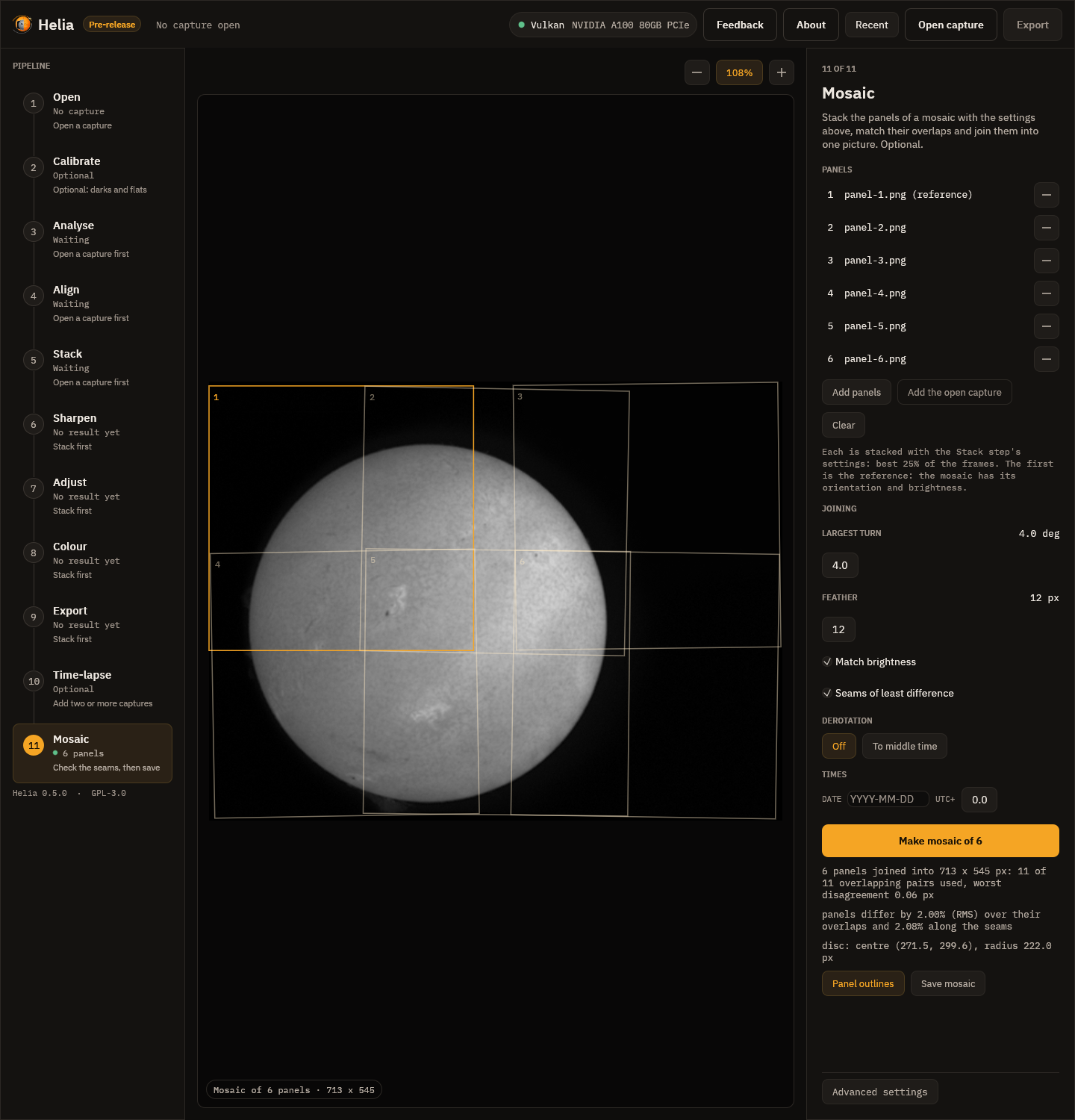
The Mosaic step. The amber outline is the reference, panel 1; the others are drawn at the shift and turn that were found. The summary under the button is the same as the command line's.
Panel outlines draws and removes the outlines; Save mosaic writes the picture and, beside
it, NAME-panels.csv and NAME-pairs.csv. In the app, the stacks use the Stack step's
settings, so choose the filter and the colour plane in the other steps first (for a capture).
4. Panels taken at different times
The Sun turns: at the equator by 0.55 degree an hour, so on a disc 222 pixels in radius the
surface has moved by 2 pixels in an hour. Panels of a mosaic are usually taken minutes
apart (and then the surface has moved by a fraction of a pixel and nothing needs doing), but for
a mosaic taken over an hour or two a seam would run across features that have moved. Add
--derotate to bring every panel to one time (by default the middle one) before joining:
helia mosaic p1.avi p2.avi p3.avi p4.avi -o m.tif --date 2026-10-20 --utc-offset 1 \
    --derotate -- --preset ha
It needs a time for every panel (the file names, SER timestamps or --date; see
Time-lapse) and enough of the limb in
the mosaic to fit the disc. The disc is fitted to a first joining; each panel is derotated with
it; the pairs are matched again and the mosaic is built. Our real panels have no times, so
this is not shown on them. On a synthetic rotating Sun, two panels four hours apart join with an
RMS error against the Sun of 0.0011 with the derotation and 0.018 without. See
Solar derotation.
What to expect and what can go wrong
| What you see | Why | What to do |
|---|---|---|
| "no two panels overlap enough to be matched" | The panels share no strip with detail in it | Take panels that overlap by at least a fifth, with some of the disc's detail or limb in the overlap; lower --min-correlation for panels with little detail |
| "panel(s) 3 do not overlap the rest enough to be placed" | A panel matched none of the others | Check that it is one of the same Sun and scale; put it first in the list, or drop it |
| "matched ... px away from where the rest put them and were not used" | A false match, or a panel that moved between captures | Look at pairs.csv; use better stacks of those panels; raise --max-rotation if the camera turned more |
| A panel is in the wrong place | The overlap had no detail and the match was a chance | Lower --max-rotation to 0 if the camera did not turn; check ncc in pairs.csv: below 0.7 is doubtful |
| Steps of brightness in the mosaic | --no-gain-match, clipped panels, or vignetting |
Leave the match on; avoid saturated panels; flat-field the captures (Calibration) |
| A visible seam | The panels differ along it: seeing, a change on the Sun, or the flat-field | Raise --feather; derotate if the panels are hours apart; look for the same feature in the overlap |
| Black edges | The panels were turned, and the bounding box holds black where none reached | Crop the result (helia edit --crop) |
| "derotation needs the whole disc, or enough of its limb" | The panels do not show the limb enough to fit it | Add the panel with the limb, or do not derotate |