Tutorial: correcting field rotation on an altazimuth mount
This tutorial corrects a long capture and a time-lapse of the Sun taken on an
altazimuth mount. It uses a real SER capture, 15_20_57.ser (1920 by 1080, 100 frames
with real timestamps), and shows the effect by giving its frames the timestamps of an
hour-long session, because the capture itself lasts only 9.5 seconds. The method is in
Field rotation. Skip all of this on an equatorial
mount: it has no field rotation.
1. Decide whether you need it
The rotation rate is 15 degrees per hour * cos(latitude) * |cos(azimuth)| /
cos(altitude). Open the capture in the app, turn on Advanced settings, set
Field rotation to Alt-az and enter the site: the line under the controls says
how far this capture rotates. For 15_20_57.ser (9.5 s, 51.5 N) it is 0.023 degrees,
0.09 pixels at the limb of a 445 pixel disc: nothing to correct. A capture of ten
minutes near noon turns by about two degrees, 16 pixels at the limb: correct it.
2. Correct a long capture
You need timestamps in every frame (SER) and the site: latitude north, longitude east, height in metres (use your own; the example uses 51.5, -0.1, 30).
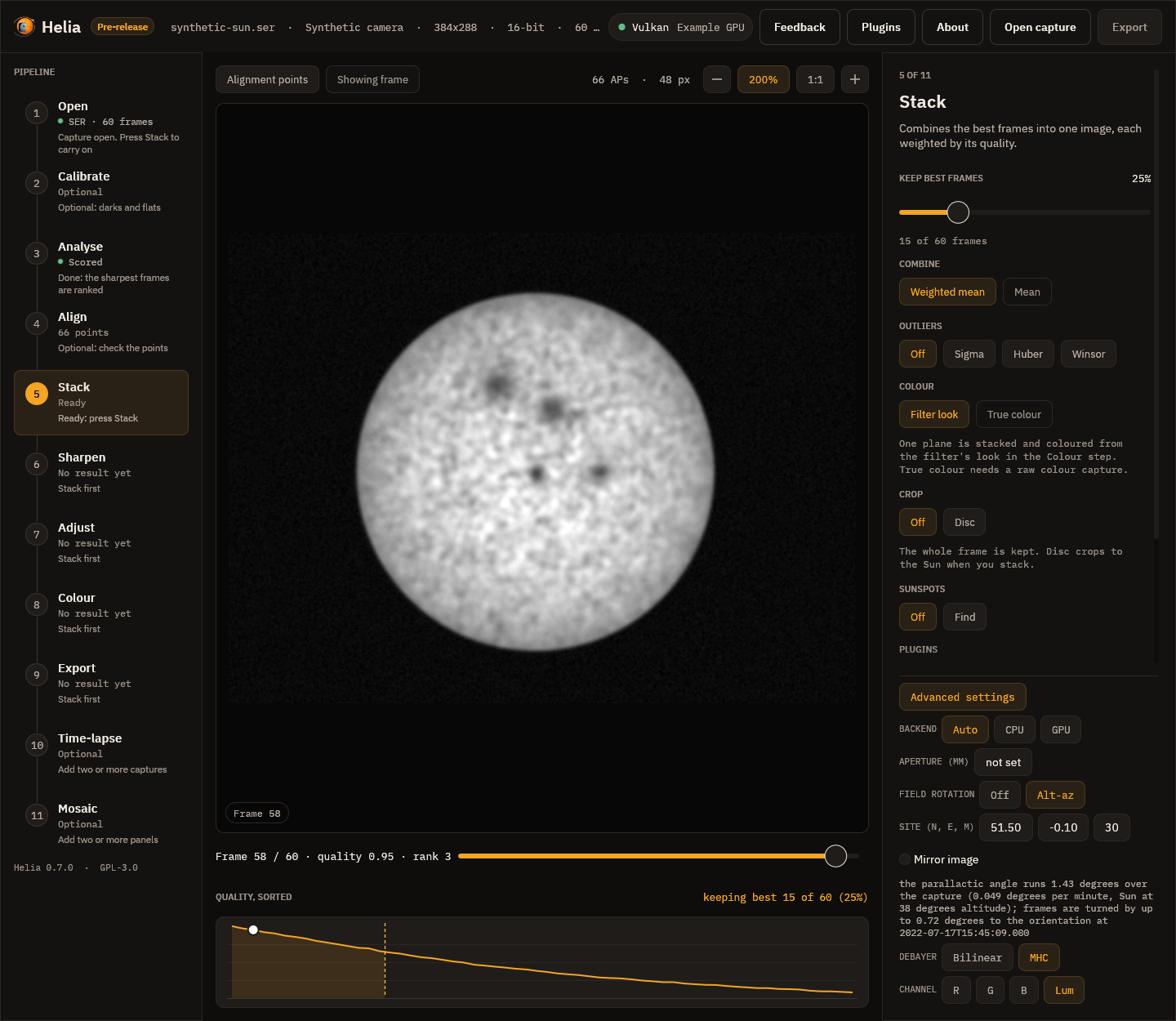
In the app: Advanced settings, Field rotation: Alt-az, the three Site
fields, then Stack as usual. If your picture is a mirror image (a star diagonal),
tick Mirror image or add --field-rotation-mirror; if the stack is not as sharp as
it should be, try the other setting.
What to expect: the run prints rotation: lines with the angle covered and the shift at
the limb, and the FITS history gets a FIELD-ROTATION step. Settings used for the
measurement below: the 100 frames of 15_20_57.ser stamped one every 36 s (an hour),
site 51.5, -0.1, the Sun at 47 degrees: 6.3 degrees in total, turns of up to 3.2
degrees, 25 pixels at the limb; best half of the frames kept.
| Granulation band (1 to 4 px), % of the mean | Frames as they were | Rotating capture | Corrected |
|---|---|---|---|
| Global alignment | 1.286 | 0.706 | 1.296 |
| Alignment points | 1.311 | 0.915 | 1.321 |
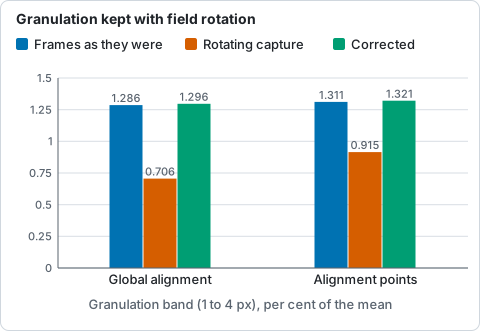
Granulation band at the disc centre for 100 frames of 15_20_57.ser given the timestamps of an hour, from the table above (higher is better).
3. Align a time-lapse
Stack each capture to FITS (the file carries DATE-AVG), then turn the images to one
orientation:
The table printed shows each image's time, the parallactic angle and the turn applied.
Images come out as sun-1100-derot.fits and so on, turned to the middle image. For
TIFF or PNG give the times: --times 2026-03-20T11:00:00,2026-03-20T11:30:00,....
Stack or crop afterwards: the corners the turn uncovers are filled with the edge level.
What can go wrong
| What you see | Why | What to do |
|---|---|---|
needs the time of each frame |
The capture has no timestamps (AVI, video) | Use a SER capture; or for stacked images give --times |
needs the observing site |
No --site and no HELIA_SITE |
Give the site |
the stars did not show which way the field turns |
A star field whose subs give no clear lock, or two that are too alike | Give --field-rotation, with --field-rotation-mirror if the picture is a mirror image, to name the sense yourself |
| The limb is still smeared | Wrong turn direction, or a clock far off | Toggle the mirror setting; check the computer's clock when you captured |
| Nothing changes | The capture is short, or the mount is equatorial | Nothing to correct |
Reference: every option
| Setting | CLI | API (config.field_rotation, with site) |
App | Range | Default |
|---|---|---|---|---|---|
| Correct the rotation | helia stack --field-rotation |
field_rotation (an object; {} for the defaults) |
Advanced settings, Field rotation: Off / Alt-az | on or off | off |
| Reference orientation | --field-rotation-reference |
reference |
middle (fixed) | middle, first, last |
middle |
| Mirror image | --field-rotation-mirror |
mirror |
Mirror image | on or off | off |
| Stop the automatic correction of FITS subs | --no-field-rotation |
not offered | not offered | on or off | off (it is automatic when the header names target, site and mount) |
| Site | --site LAT,LON,ALT or HELIA_SITE |
site or the server's HELIA_SITE |
Site (N, E, M) | latitude -90 to 90, longitude -180 to 180, height -1000 to 10000 m | none |
| Time-lapse | helia derotate IMAGES -o DIR with --site, --times, --reference (middle, first, last or an image number), --mirror, --overwrite |
not offered | not offered | middle |
Results appear in summary.field_rotation in the API.