White-light granulation
Goal: the fine cell pattern of the photosphere (granulation) and sunspot structure, from a white-light capture.
How far this is tested. Not on granulation, and this page used to say it was. The defaults below were first measured on four captures believed to be sodium; the owner has since said that
15_32_09.aviis H-alpha, and the other three from that session (Sun_Test.ser,15_20_57.ser, and the same scene) show the same prominence, filaments and plage, so they are H-alpha too: what they measured was chromospheric mottle, not granulation. The one real white-light capture so far is a Seestar video at 2.4 arcsec per pixel, where a granule is smaller than a pixel. So the frame share, point size and wavelet gains of the white-light and sodium presets are reasoned, not measured on granulation; treat them as where to start and look at your own picture.
You need: a capture of the Sun through a white-light solar filter (a Baader
film, or a Herschel wedge with a neutral density filter), with white, whitelight or wl in the
file name, recorded with a short exposure at a good image
scale. Granulation is small, of the order of an arc second across; see
Sampling.
Settings
Press White light on the Quick stack card, or use --preset white. The preset
is already tuned for granulation, because that is what a white-light picture is
for:
| Setting | Default | Why |
|---|---|---|
| Frames kept | 12% | Granulation has low contrast, so only the sharpest frames show it. Keeping 25% averaged soft frames over the granulation scale and lost it |
| Alignment point size | 32 px at full-HD scale; from the image scale when it is known | Two to three granules (a granule is about 1.5 arcsec). Seeing distorts a granule-sized patch differently from the next; small points follow it |
| Wavelet gains | 2.00, 2.80, 2.20, 1.30, 1, 1 | Granulation sits on layers 2 and 3, so they are lifted most |
| Wavelet noise cuts | 1.0, 0, 0, 0, 0, 0 | The finest layer keeps its cut, so pixel noise is not boosted. A cut on layers 2 and 3 removes low-contrast granulation along with the noise, so they have none |
The sodium D preset (--preset na) takes the same frame share and point size, with
gains 1.50, 2.60, 2.00, 1.30 and noise cuts 2.0, 0, 0, 0, and stacks the green
channel. The chromospheric presets (H-alpha, Ca K and H, He D3, H-beta) are not
tuned for granulation and keep their general values.
When the image scale is unknown, as it is before the limb has been fitted,
Helia uses 32 pixels for a capture about 1080 pixels high and scales that with the
short side of the frame. Give --ap-size if you know better.
On the command line
Everything above is a default, so the first command needs no more. To try other
values, --keep 15% --ap-size 40 --sharpen wavelet --wavelet-gains 1.5,2.0,1.6
replaces them (--wavelet-gains replaces the first layers and leaves the rest at
the recommended values), and helia measure says whether granulation went up.
Measuring granulation
helia stack also prints a granulation report for a white-light or sodium stack, and writes it into the FITS header; see the granulation and seeing report.
helia measure takes a finished image (TIFF, PNG or FITS) and prints the
band-pass contrast, the standard deviation over the mean, of a 240 pixel crop at
the centre of the disc in three bands:
| Band | Detail | What dominates |
|---|---|---|
| fine, 0 to 1 px | Pixel-scale structure | Noise |
| granulation, 1 to 4 px | Cells of a few pixels | Granulation, plus some noise |
| meso, 4 to 12 px | Larger groupings, slow variation | Brightness changes, seeing |
Compare images of the same capture, scale and bit depth. A rise in the granulation band with the fine band flat or falling is granulation; a rise in both is mostly noise, so look at the crop as well.
What was measured, and on what
The Na D numbers that used to stand here were measured on H-alpha captures read through the green plane (keep 25 per cent, 64 px points, all channels, general wavelets against keep 12 per cent, 32 px points, green, the Na gains):
| Capture (H-alpha) | Band 1 to 4 px before | after | Fine band before | after |
|---|---|---|---|---|
Sun_Test.ser, 8-bit |
1.54% | 2.94% | 1.64% | 1.48% |
15_20_57.ser, 16-bit |
1.98% | 3.23% | 2.95% | 2.13% |
15_32_09.avi, 8-bit, 720 x 540 |
0.55% | 1.52% | 0.23% | 0.45% |
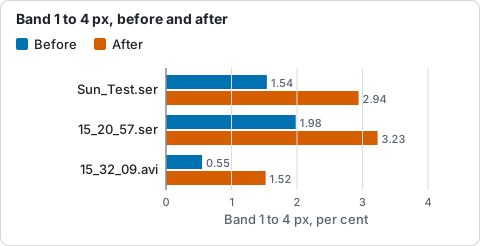
Band 1 to 4 px before and after the white-light settings on three H-alpha captures, from the table above.
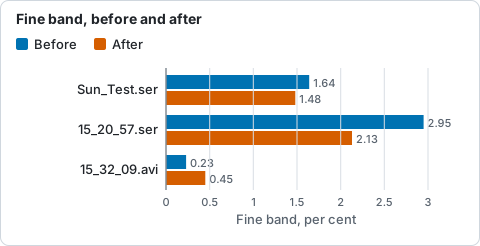
Fine band before and after the white-light settings on three H-alpha captures, from the table above.
They show the settings suit a bright, finely mottled disc seen in the green
plane; they say nothing about granulation or about sodium. The white-light data to
hand (2025-09-17-161400-Solar.mp4, 2.4 arcsec per pixel; the calcium K colour
capture is not white light) has no granulation to measure, and a stack of it is
better from the green plane than the luminance because the app clips the red (see
MP4 from a phone). A white-light capture at 0.3 arcsec per
pixel or finer, and a real sodium one, would settle the rest.
In the app
The White light and Na D buttons set all of this. To go further, on Align choose a smaller point size; on Stack drag Keep best frames down to 10 per cent; on Sharpen raise the gains of layers 2 and 3. Use Before / after at Full size and zoom to 100 per cent to judge.
What to watch for
- Grain is not granulation. With few frames the noise has a similar size. If the "cells" differ from one export to the next with different frame counts, it was noise.
- Ringing round sunspots from too much gain. The deconvolution guard exists for this; with wavelets, ease the gain on layers 3 and 4.
- 8-bit captures limit granulation. Granulation is a few per cent of the brightness and one 8-bit step is about 0.4 per cent of full scale, so an 8-bit capture shows it coarsely however it is processed. Record 12 or 16-bit if the camera allows it (see Capturing).
- A FITS file is the unsharpened stack, so measurements are not affected by any of this.
Related: Sharpening and adjustments.