Tutorial: drive Helia from your own code with the API
Goal: start helia serve with a token and a data root, and use it step by
step: inspect a capture, start a job with the newer options (limb flattening,
autocrop, robust stacking, seeing), watch it by polling and by WebSocket, and fetch
the result, the preview and the summary. First with curl, then in one Python script.
You need: a Helia build and a capture. Scripting with the
API is the short recipe (standard library
only, polling); The API and the
API reference list every route and field. This tutorial is
the long walk-through that uses them. Everything below was run against the 0.5.0
build at commit 0f2c542, on 15_20_57.ser (an ASI482MC H-alpha capture of the
2022-07-17 set, 100 frames, renamed disc.ser to show that you can name the
filter yourself) and, for true colour, 14_42_57.avi. Tokens are shown as
<token>.
1. Start the server
Make a folder that is the data root, and put the capture in it. Every path a client sends is relative to it and cannot escape it.
mkdir -p apiroot/captures
cp 15_20_57.ser apiroot/captures/disc.ser
python3 -c "import secrets; print(secrets.token_urlsafe(24))" > token.txt
chmod 600 token.txt
helia serve --data-root apiroot --token-file token.txt --bind 127.0.0.1:7871
The token comes from a file so that it is not in the process list. Without
--bind the port is 7870. The server listens on the loopback address only: asked
to bind anything else without a token it stops:
helia: refusing to bind 0.0.0.0:7872: a non-loopback address needs a token (--token or --token-file)
For the rest of the page:
2. Is it up, and who am I
GET /health needs no token; everything else does.
curl -s $B/health
# {"status":"ok"}
curl -s -i $B/version | head -1; curl -s $B/version
# HTTP/1.1 401 Unauthorized
# {"error":{"code":"unauthorized","message":"a valid bearer token is required"}}
curl -s -H "$A" $B/version | jq -c '{version,build:.build.commit,backends}'
{"version":"0.5.0","build":"0f2c5426","backends":{"cpu":{"available":true},"gpu":{"available":true,"adapter":"NVIDIA A100 80GB PCIe (Vulkan, DiscreteGpu)","software":false}}}
Every error has the same shape, {"error": {"code": ..., "message": ...}}, and
code is stable.
3. Inspect the capture
curl -s -H "$A" -H "Content-Type: application/json" \
     -d '{"path":"captures/disc.ser"}' $B/captures/inspect | jq '{format,width,height,bit_depth,colour,bayer,frames,recommended,effective,notices}'
{
  "format": "ser", "width": 1920, "height": 1080, "bit_depth": 16,
  "colour": "bayer", "bayer": "rggb", "frames": 100,
  "recommended": {"filter": null, "filter_source": null, "channel": "lum", "keep_percent": 25.0, "ap_size": 64},
  "effective": {"byte_order": {"value": "little", "source": "detection"}, "...": "..."},
  "notices": [{"level": "info", "text": "The header flag says big-endian, but the pixel data only makes sense as little-endian; Helia reads it that way."}]
}
This is helia info as JSON. Three things to read: colour and bayer say a raw
mosaic (so colour: "true" is allowed); recommended.filter is null because
the file name disc.ser says nothing, so the job below names the filter
itself; and the notice is the byte-order correction Helia made.
4. Start a job with the newer options
A job is an input, an output and a config. The config below names the
filter, flattens the limb darkening, crops to the disc, guards against outliers
and asks for the seeing:
cat > job.json <<'EOF'
{"input": "captures/disc.ser", "output": "stacks/disc.tif", "overwrite": true,
 "config": {"preset": "ha", "keep": "25%",
            "limb_law": "quadratic", "flatten": "model",
            "autocrop": true, "autocrop_margin": 10,
            "robust": "sigma", "robust_k": 2.5,
            "seeing": true, "aperture_mm": 80}}
EOF
curl -s -H "$A" -H "Content-Type: application/json" -d @job.json $B/jobs | jq -c '{id,state,queue_position}'
The fields, each the same as the command line: preset (--preset ha), keep
(--keep 25%), limb_law and flatten (see the limb
tutorial), autocrop and autocrop_margin (the crop
tutorial), robust and robust_k (robust
stacking), seeing and aperture_mm (measure and
seeing). Without overwrite a second run of the same
output is refused (see Troubleshooting).
5. Poll the job
A queued job has state: "queued" and a queue_position; a running one has a
stage (opening, quality, reference, global_align, local_align, stack,
finish, then edit when edits are applied, colourise and write) with
stage_progress 0 to 1 and an approximate overall progress. This one took 4.1 s:
{"state":"succeeded","stage":"write","progress":1.0,"run_seconds":4.11,
 "timings":[{"stage":"quality","seconds":0.33},{"stage":"reference","seconds":0.13},
            {"stage":"global_align","seconds":0.20},{"stage":"local_align","seconds":0.25},
            {"stage":"stack","seconds":0.56},{"stage":"finish","seconds":2.12}]}
The result of the run is in summary:
curl -s -H "$A" $B/jobs/1 | jq '.summary | {frames,kept,registered,width,height,filter,filter_source,crop,limb_darkening,alignment}'
{"frames": 100, "kept": 25, "registered": 50, "width": 979, "height": 979,
 "filter": "ha", "filter_source": "chosen",
 "crop": {"x": 299, "y": 63, "w": 979, "h": 979},
 "limb_darkening": {"law": "quadratic", "names": ["u1", "u2"], "coefficients": [0.47108424, 0.04655085],
                    "limb_level": 0.48236492, "rms": 0.0066025066, "radius_px": 444.5765,
                    "text": "quadratic: u1 = 0.471, u2 = 0.047; limb at 48% of the centre; rings differ from the law by 0.66% rms"},
 "alignment": {"requested": "auto", "method": "phase", "reason": "limb fit not confident enough, 0.67", "confidence": 0.9999991, "fallbacks": 0, "...": "..."}}
These are the numbers of the command line run: the 979 x 979 crop from (299, 63),
the quadratic law with u1 0.471, u2 0.047 and rings 0.66% off. The seeing came
back as well:
curl -s -H "$A" $B/jobs/1 | jq '.summary.seeing | {motion_px,motion_arcsec,d_over_r0,r0_cm,r0_500nm_cm,grade}'
{"motion_px":0.19070768,"motion_arcsec":0.4114134,"d_over_r0":4.0439334,"r0_cm":1.9782718,"r0_500nm_cm":1.427391,"grade":null}
grade is null, and summary.seeing.lines says why: a 64 pixel tile spans 138
arcsec, far more than an isoplanatic patch. A field that did not apply is null:
granulation is null here because H-alpha has no granulation, true_colour
because the colour was not asked for.
6. Follow it live: the WebSocket
GET /jobs/{id}/events streams the same progress without a delay. The first
message is always a snapshot; the server closes the stream after the final
state. Browsers cannot set the Authorization header on a WebSocket, so use a
program. In Python (pip install websockets; version 17.3 here):
import asyncio, json, websockets

async def follow(job_id):
    url = f"ws://127.0.0.1:7871/api/v1/jobs/{job_id}/events"
    async with websockets.connect(url, additional_headers={"Authorization": f"Bearer {TOKEN}"}) as ws:
        async for text in ws:
            print(json.loads(text))
or, with websocat installed, websocat -H "$A" ws://127.0.0.1:7871/api/v1/jobs/1/events.
What the full script below printed for a second run of the job (progress is thinned
to about one message per half a percent of overall progress):
  snapshot: job 2 is running
  quality         16%  overall   3%
  quality         32%  overall   6%
  ...
  reference      100%  overall  25%
  global_align    32%  overall  31%
  local_align     14%  overall  48%
  ...
  stack           98%  overall  94%
  finish         100%  overall 100%
  edit           100%  overall 100%
  colourise      100%  overall 100%
  write          100%  overall 100%
  state -> succeeded
7. Fetch the result and the preview
curl -s -H "$A" -o disc.tif -w '%{http_code} %{content_type} %{size_download}\n' $B/jobs/1/result
# 200 image/tiff 5751623
curl -s -H "$A" -o disc.png -w '%{http_code} %{content_type} %{size_download}\n' "$B/jobs/1/preview.png?max_width=800"
# 200 image/png 244286
The result is the file the job wrote (a 979 x 979 16-bit TIFF, flattened,
cropped, coloured with the H-alpha look); the preview is an 8-bit PNG of it at
most max_width wide.
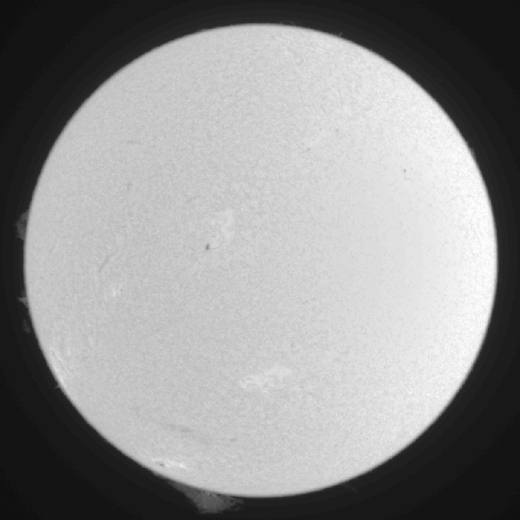
The preview from GET /jobs/1/preview.png?max_width=800, reduced to 520 pixels and
to 64 grey levels for the book.
8. All of it in one Python script
This script uses requests for the REST calls and websockets for the events. It
inspects, queues, follows, checks the summary and saves the result and the
preview. Run:
export HELIA_TOKEN=$(cat token.txt) HELIA_URL=http://127.0.0.1:7871/api/v1
python stack_via_api.py captures/disc.ser stacks/py.tif
#!/usr/bin/env python3
"""Stack a capture through a running `helia serve`, follow it live, save the result.

    export HELIA_TOKEN=...            # the server's token
    python stack_via_api.py captures/disc.ser stacks/disc.tif

Needs `requests` and `websockets`. Paths are relative to the server's data root.
"""
import asyncio
import json
import os
import sys

import requests
import websockets

BASE = os.environ.get("HELIA_URL", "http://127.0.0.1:7870/api/v1")
TOKEN = os.environ["HELIA_TOKEN"]
HEADERS = {"Authorization": f"Bearer {TOKEN}"}


def api(method, path, **kw):
    r = requests.request(method, BASE + path, headers=HEADERS, timeout=60, **kw)
    if not r.ok:
        err = r.json()["error"]
        sys.exit(f"{method} {path}: {r.status_code} {err['code']}: {err['message']}")
    return r


async def follow(job_id):
    """Print each progress message until the server closes the stream."""
    url = BASE.replace("http", "ws", 1) + f"/jobs/{job_id}/events"
    async with websockets.connect(url, additional_headers=HEADERS) as ws:
        async for text in ws:
            msg = json.loads(text)
            if msg["type"] == "progress":
                print(f"  {msg['stage']:13} {msg['stage_progress']:5.0%}  overall {msg['progress']:4.0%}")
            elif msg["type"] == "state":
                print(f"  state -> {msg['state']}")
            else:
                print(f"  {msg['type']}: job {msg['job']['id']} is {msg['job']['state']}")


def main():
    src, dst = sys.argv[1], sys.argv[2]
    info = api("POST", "/captures/inspect", json={"path": src}).json()
    print(f"{src}: {info['frames']} frames, {info['width']} x {info['height']}, {info['bit_depth']}-bit")

    job = api("POST", "/jobs", json={
        "input": src, "output": dst, "overwrite": True,
        "config": {
            "preset": "ha", "keep": "25%",
            "flatten": "model", "limb_law": "quadratic",
            "autocrop": True, "autocrop_margin": 10,
            "robust": "sigma", "robust_k": 2.5,
            "seeing": True, "aperture_mm": 80,
        },
    }).json()
    print("queued job", job["id"])

    asyncio.run(follow(job["id"]))

    job = api("GET", f"/jobs/{job['id']}").json()
    if job["state"] != "succeeded":
        sys.exit(f"job {job['state']}: {job['error']}")
    s = job["summary"]
    print(f"kept {s['kept']} of {s['frames']} frames; result {s['width']} x {s['height']}")
    print("limb:", s["limb_darkening"]["text"])
    print("crop:", s["crop"])

    local = os.path.basename(dst)
    with open(local, "wb") as f:
        f.write(api("GET", f"/jobs/{job['id']}/result").content)
    with open(os.path.splitext(local)[0] + ".png", "wb") as f:
        f.write(api("GET", f"/jobs/{job['id']}/preview.png", params={"max_width": 800}).content)
    print("saved", local)


if __name__ == "__main__":
    main()
The last lines of its output:
  state -> succeeded
kept 25 of 100 frames; result 979 x 979
limb: quadratic: u1 = 0.471, u2 = 0.047; limb at 48% of the centre; rings differ from the law by 0.66% rms
crop: {'x': 299, 'y': 63, 'w': 979, 'h': 979}
saved py.tif
If you do not want the WebSocket, replace asyncio.run(follow(...)) by a loop
that calls GET /jobs/{id} every second until state is no longer queued or
running, as in the recipe.
9. True colour over the API
colour: "true" with white_balance ("auto", "off" or "R,G,B") and
align_channels stacks the red, green and blue planes (the true colour
tutorial). On 14_42_57.avi (with its sidecar beside it, as
captures/broad.avi and captures/broad.CameraSettings.txt):
curl -s -H "$A" -H "Content-Type: application/json" \
     -d '{"input":"captures/broad.avi","output":"stacks/broad.tif",
          "config":{"colour":"true","white_balance":"auto","align_channels":true}}' $B/jobs
curl -s -H "$A" $B/jobs/3 | jq -c '.summary.true_colour, .summary.colour'
{"gains":[0.9495293,1.2262009,1.0763367],"channels":[{"channel":"red","shift":[0.08035069,0.032591455],"confidence":1.0,"applied":true},{"channel":"blue","shift":[-0.121741,-0.05774992],"confidence":1.0,"applied":true}],"notes":["True colour: red, green and blue stacked on one alignment; white balance automatic (the disc centre is made neutral); gains 0.950, 1.226, 1.076","Channel alignment: red moved (+0.08, +0.03) px onto green (confidence 1.00)","Channel alignment: blue moved (-0.12, -0.06) px onto green (confidence 1.00)"]}
"true colour"
The gains and shifts are the ones the command line printed.
10. List and cancel
GET /jobs lists the remembered jobs, oldest first, as an array. DELETE
/jobs/{id} cancels a queued or running job (202) and forgets a finished one
(204; the output file stays), after which the job is gone:
curl -s -o /dev/null -w '%{http_code}\n' -X DELETE -H "$A" $B/jobs/2    # 204
curl -s -H "$A" $B/jobs/2/result
# {"error":{"code":"job_not_found","message":"no job 2"}}
What to expect and how to tell it worked
GET /healthanswers without a token; every other call without one gets401.- A job moves
queued,running,succeeded;summaryis filled only when it succeeded. - The result file is the one the command line would write for the same options.
Compare the numbers: here the same crop (979 x 979 from (299, 63)) and the same
limb fit as
helia stackprinted. - The data root holds the output (
stacks/disc.tif); the server does not write anywhere else.
Troubleshooting
All of these were produced against the running server above.
401 unauthorized: a valid bearer token is required. The header is missing or wrong. It isAuthorization: Bearer <token>, and the token is the one the server was started with (--token,--token-fileorHELIA_TOKEN). OnlyGET /healthand the static/docspage are open.path_traversal: `..` is not allowed in paths. Every path is relative to the data root and cannot leave it. Copy or link the capture into the root (the captures here are hard links).not_found: no such file. The path is relative to the data root, not to where you run the client.output_exists: output exists; set overwrite to replace it. Add"overwrite": trueto the request.invalid_config: `flatten` must be `model` or `profile`. A config value is out of range. The message names the field. Other messages seen:`robust_k` needs `robust` other than `none`and`autocrop_margin` must be between 0 and 200 percent. A bad value is refused when the job is queued, not after minutes of stacking.422 invalid_json: ... missing field `input`. The body must be an object withinputandoutput.429 queue_full: 1 jobs already queued or running. The queue is full (--max-queue, default 16, here set to 1 to show it). Wait, or cancel a job. Keep--workersat 1 on a GPU.413 body_too_large. A request body is limited to 64 KiB. Send paths and settings, not data.helia: refusing to bind 0.0.0.0:7872: a non-loopback address needs a token. Give--token-file, and put a TLS proxy in front of it: see the security model.- The WebSocket is refused or closes at once. It needs the same header as the rest; a browser cannot send one. A finished job yields a snapshot and then the server closes the stream, which is not an error.
See also
- Scripting with the API: the short recipe.
- The API and the API reference
(every field of the config and the summary);
GET /docson the running server. - Batch processing.